
Connect Lynka to the AI tools you already use Bring Claude, ChatGPT, and more into your everyday workflow.

Cookie consent

By clicking “Allow analytics”, you agree to the optional analytics cookies described in our Privacy Policy. Essential storage keeps Lynka working.

Privacy policy
Lynka
Pricing
Sign inGet started free

Real-estate teams

Free real estate CRM for your next follow-up.

Keep buyer enquiries, requirements and the next call together. Free Forever supports one user and all 11 fields in the Real Estate Playbook. Choose a paid plan for additional fields or team access.

Start FreeSee pricing

Use Case

Save the requirements before the next conversation.

A buyer asks about a two-bedroom apartment, gives you a budget and says to call next week. Save those details with the enquiry and schedule the call before the conversation gets buried.

Free Forever includes Sales, Agreements and Inventory for one user, 1 GB of storage and three one-time business LeadGen credits. The complete Real Estate Playbook uses all 11 available active custom-field slots across the workspace.

Requirements

Start with notes and follow-ups. Check field limits before choosing a playbook.

Enquiries

The current form also requires Company name. For an individual enquiry, use a consistent household or enquiry label according to your own record-keeping policy. Do not invent an employer. Free allows 11 active custom fields across the whole workspace. With the complete playbook installed, all 11 slots are in use; keep any extra requirements in notes.
Qualification

Its stages are New enquiry, Qualified, Viewing, Offer, Negotiation, Contract, Won and Lost, with Disqualified available for unsuitable enquiries. These are fields and stages for work you record, not a property listing service or a source of individual buyer leads.

Setup

Open a lead and check for the Real Estate field section, then check the Deals stages. Do not assume the playbook is active just because the industry is selected. For an existing workspace or a pending setup, ask support to check activation; a self-service activation control has not been verified.

Follow Up

Once an enquiry becomes a real opportunity, track it as a Deal. With the playbook installed, record the Viewing date and Offer amount there. Without it, keep those details in the record notes and a dated activity.

Fit

Use specialist tools for MLS access, listing publication and tenant accounting. Lynka does not provide those services or automated WhatsApp messaging. Its job here is to help you record the enquiry, follow-up and opportunity.

Solution

From a property enquiry to a dated next step.

Enquiries

Record what the buyer is actually looking for

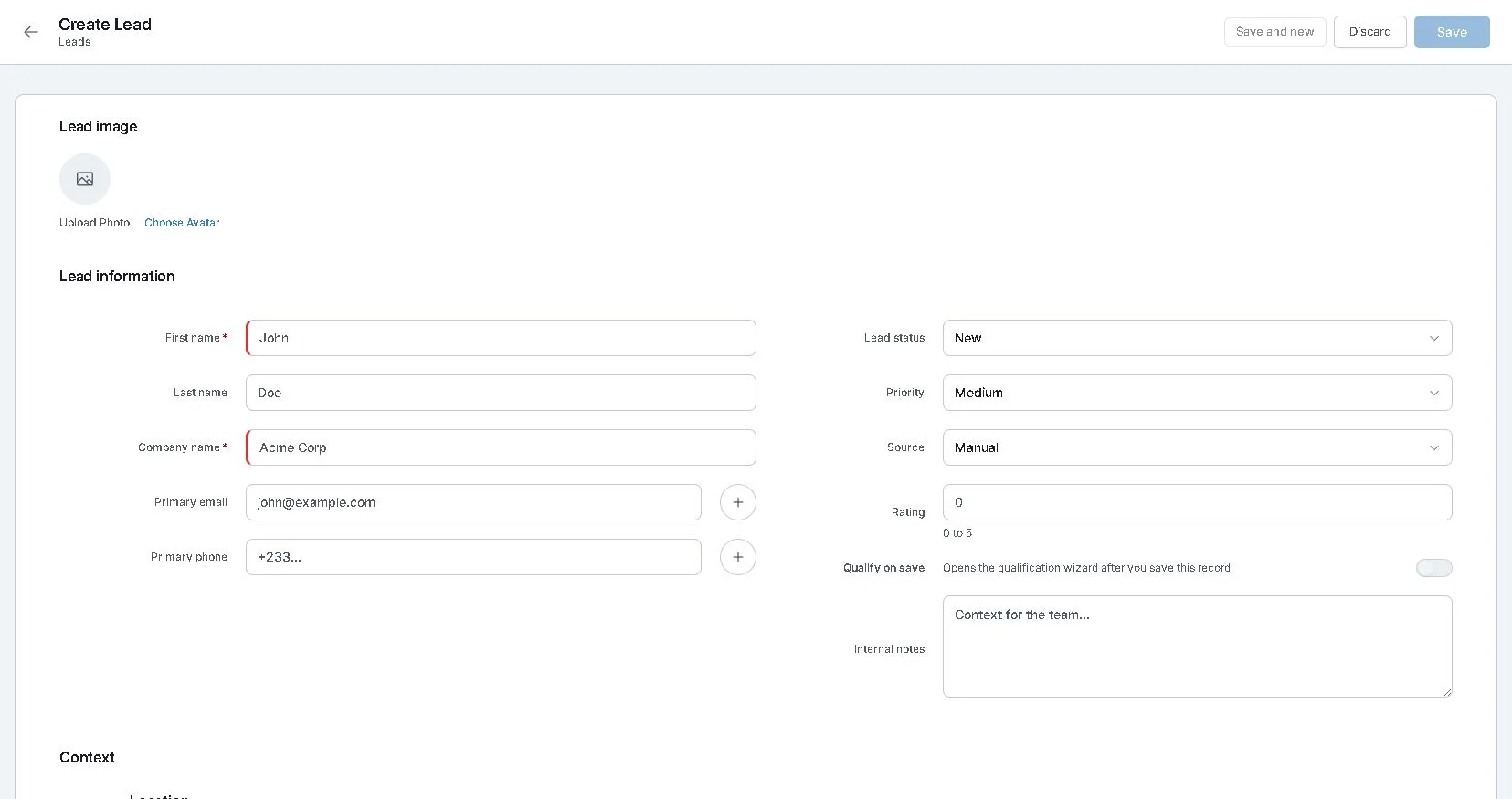
Open Sales, choose Leads and select Create lead. Record the contact details, source and notes. Keep the preferred location, property type, budget, bedrooms, financing and buying timeline in the notes while you qualify the enquiry.

The current form also requires Company name. For an individual enquiry, use a consistent household or enquiry label according to your own record-keeping policy. Do not invent an employer. Free allows 11 active custom fields across the whole workspace. With the complete playbook installed, all 11 slots are in use; keep any extra requirements in notes.

Live Lynka Create Lead screen with contact details, source, priority and internal notes
The standard lead form, captured from the live app on October 26, 2026. This screen does not show an installed real-estate playbook.

Qualification

Know what the real-estate playbook adds

The playbook defines Buy, Sell, Rent and Lease intent; property type; preferred area; minimum and maximum budget; bedrooms; timeline; financing status; and property reference on Leads. Deals have Viewing date and Offer amount fields.

Its stages are New enquiry, Qualified, Viewing, Offer, Negotiation, Contract, Won and Lost, with Disqualified available for unsuitable enquiries. These are fields and stages for work you record, not a property listing service or a source of individual buyer leads.

The complete playbook fits Free

Free allows 11 active custom fields total across the workspace, with no monthly refill or expiration. The complete playbook uses all 11 slots, leaving none for additional active fields. Pro allows 20 per entity and Teams allows 50. Activation still needs the Real Estate industry, owner/admin access and permission to manage custom fields. Other existing active fields can leave too little room for the full setup.

Setup

Check the setup after onboarding

During first workspace onboarding, select Real Estate as the industry. The server attempts to install the playbook when onboarding completes. If permissions, field limits or a conflicting existing field prevent installation, onboarding can complete with the playbook still pending.

Open a lead and check for the Real Estate field section, then check the Deals stages. Do not assume the playbook is active just because the industry is selected. For an existing workspace or a pending setup, ask support to check activation; a self-service activation control has not been verified.

Follow the property enquiry setup guide

Follow Up

Give the next call or viewing a date

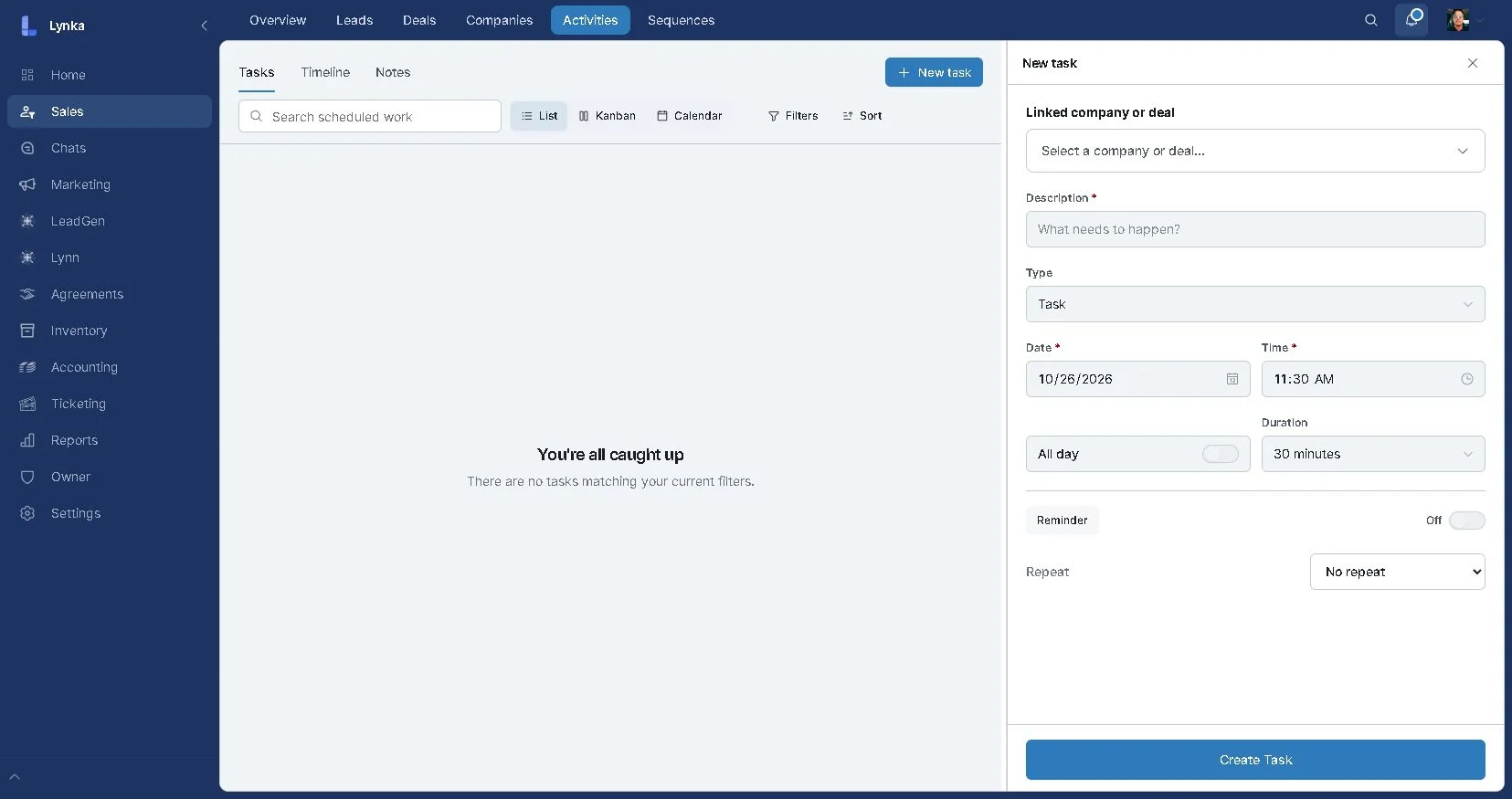
In Sales, open Activities and choose New task. Give the follow-up a clear title, set the due date and link the relevant record using the controls available in your workspace.

Once an enquiry becomes a real opportunity, track it as a Deal. With the playbook installed, record the Viewing date and Offer amount there. Without it, keep those details in the record notes and a dated activity.

Live Lynka New task form with linked company or deal, description, date, time and reminder controls
The live follow-up form. It links to a company or deal, so keep the relevant enquiry context there.

Fit

Separate property enquiries from business prospecting

Add property enquiries from your own referrals, conversations and existing records. Lynka’s built-in LeadGen finds businesses by market. It does not generate individual property-buyer leads.

Use specialist tools for MLS access, listing publication and tenant accounting. Lynka does not provide those services or automated WhatsApp messaging. Its job here is to help you record the enquiry, follow-up and opportunity.

Results

The team can see what deserves attention next.

Keep each enquiry’s budget, location and requirements in the record.

Put the next call or viewing on a dated activity.

Track serious opportunities as deals.

Use the full property fields only after checking activation and plan eligibility.

Explore Lynka

Track property enquiries, viewings and follow-upsStart Free with Lynka CRMSee free business management tools and limitsFind and save business prospectsSee Lynka plans and pricing

Start with the enquiry you need to call back.

Create a free workspace for your own sales records. Check the plan limits before choosing the full real-estate playbook.

Start FreeSee pricing
Lynka
Deals
Leads
Companies
Activities
New deal
⌂
◔
≣
⌁
▦
Search deals...
My deals
Filters
Qualified
2
Northstar Logistics
Maya Bennett
Qualified
USD 28,900
Cedar Grove Interiors
Liam Carter
Qualified
USD 12,400
Proposal
2
BluePeak Trading
Jordan Lee
Proposal
USD 46,200
Skyline Dental
Olivia Hart
Proposal
USD 18,750
Negotiation
2
Harbor Medical
Emma Brooks
Negotiation
USD 91,000
Atlas Retail Group
Noah Reed
Negotiation
USD 34,600
BluePeak Trading
Jordan Lee · Proposal
Overview
Email
Activity
Notes
Deal value
USD 46,200
Stage
Proposal
Owner
Jordan Lee
Expected close
Sep 18, 2026
Probability
64%
Next action
Send revised quote

Questions about Real-estate teams

Is Lynka a free real estate CRM?

Free Forever lets one user manage sales enquiries, deals and follow-ups with 1 GB of storage. It includes three one-time LeadGen credits for business prospecting. The complete Real Estate Playbook fits Free and uses all 11 available active custom-field slots across the workspace.

Lynka

Lynka combines business lead generation and CRM, so smaller businesses can find prospects and manage customer work in one place.

LinkedInFacebookInstagram

Explore Lynka with AI

Product

  • Free CRM
  • Overview
  • Lead Generation
  • Sales
  • Agreements
  • Inventory
  • Accounting
  • Support
  • Marketing
  • Reporting

Built For

  • Overview
  • Small businesses
  • All industries
  • Agencies
  • Consultants & professional services
  • Distributors & wholesalers
  • Field service businesses
  • Small sales teams

Workflows

  • Agency Prospecting
  • Distributor Sales
  • Advisory Billing

Compare

  • vs HubSpot
  • vs Pipedrive
  • vs Zoho CRM
  • vs Excel

Company

  • Pricing
  • About
  • Support
  • Contact
  • Developer resources
  • Docs
  • Free tools
  • Blog

Legal

  • Privacy Policy
  • Terms of Service
  • Refund Policy
  • Data Processing Agreement
  • Security
  • Subprocessors
  • Service and Support
  • Acceptable Use
  • Cookie Policy
© 2026 Lynka. All rights reserved.